Approov Architecture
This describes the overall architecture of Approov and familiarizes you with the key concepts required to understand the steps in the Approov integration.
Key Components
The key components of Approov are detailed in the following diagram:
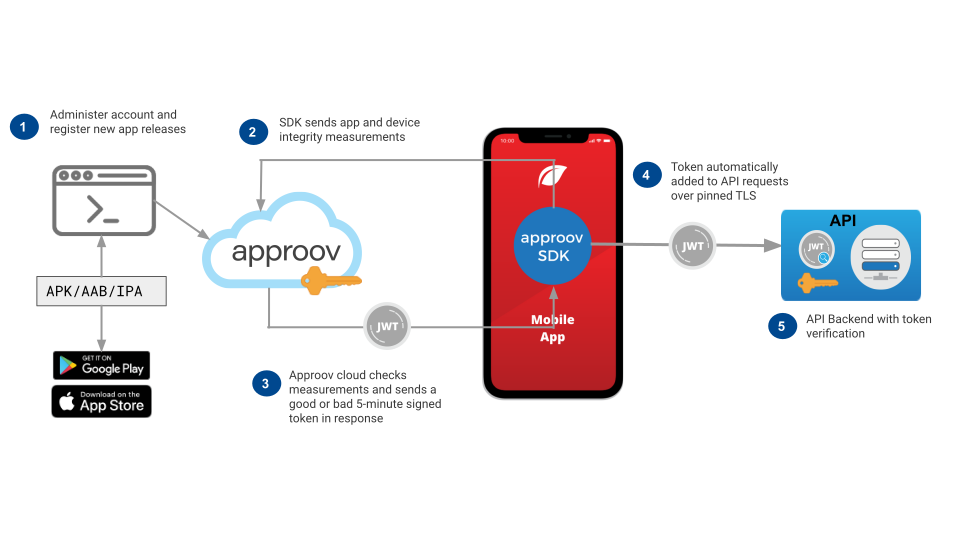
The steps required to obtain an Approov token are as follows:
- You will be able to administer the properties of your account using the
approovcommand line tool and Approov account access you were issued upon sign up. A key aspect of this administration is to add the app signing certificates associated with your apps to the Approov account. This enables Approov to recognize those apps as being official. It is also possible to register individual versions of the app as being official on a more ad hoc basis if necessary. - The integrity check process requires the SDK and the Approov cloud service to work together. The process is initiated when you make an API call that requires an Approov token to be added. The SDK analyzes the runtime environment of the app and the authenticity of the app that is being measured. These checks are implemented in hardened code and communications are protected both by TLS and also by a secondary level of request integrity signing.
- The Approov cloud service performs analysis on the data provided by the SDK and makes a decision based on this and the security policy criteria you set for your account. If the criteria are met then the Approov cloud provides a short lived token signed with a symmetric secret allocated randomly during your account sign up. If the criteria are not met then a token is still issued, but it is not signed with the correct secret.
Options are also available to use other secrets or other signing algorithms, including those with asymmetric keys.
- The obtained Approov token should be transmitted with a backend API request. This is done automatically using our Mobile App Quickstarts. Typically the token is added as the additional header
Approov-Token, but the approach can be customized. It is important that all communications made by these APIs are pinned so that no Man-in-the-Middle (MitM) interception is possible that could make a copy of the short lived token. Pinning TLS connections is good security hygiene anyway, as it prevents customer data being intercepted in the same way. The Approov quickstarts automatically perform this pinning.
Note that once an Approov token has been obtained it is cached by the SDK for up to 5 minutes so that subsequent API calls do not require additional communication with the Approov cloud service.
- Your backend API is able to check the validity of the Approov token by checking it has been correctly signed with the secret. If it is, then you know that the API request is really coming from an official registered version of your app; it is not being spoofed by some other entity. Moreover, a valid Approov token also indicates that the checks on the runtime environment have passed, as controlled by the security policy you have set in your account. Since the signing key is never put inside the app, an attacker cannot reverse engineer it in order to create their own signed Approov tokens without going through the integrity measurement process.
Backend Integration Options
There are different backend integration options depending upon whether you are protecting your own API backend, or are using Approov to protect API keys used to access 3rd party APIs. In either case an attestation is performed and a decision is made about whether the app and runtime environment are valid.
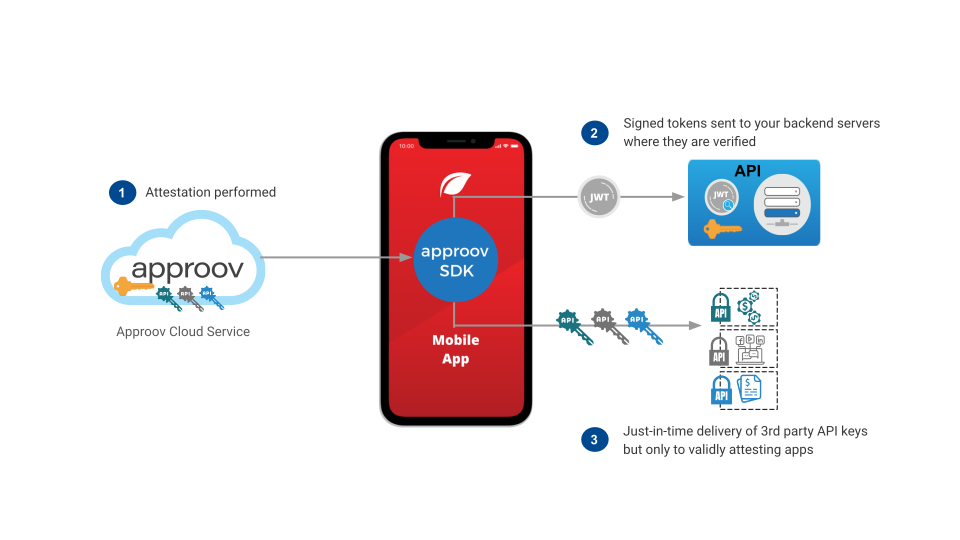
If you have your own backend then we recommend that you use our Backend API Quickstarts. These provide examples for checking JWTs across a wide range of different backend technologies. If the provided JWT is incorrectly signed, has expired or if no JWT is presented at all, then the request can be rejected. If the app and/or environment have failed attestation then an incorrectly signed JWT is sent to the backend. Thus if there is a valid JWT you can be sure that the request is coming from an attested app.
Even if you don't want to, or can't, modify the backend you can still use Approov for enhanced protection. Approov is able to protect API keys and only deliver those just-in-time to apps that pass the attestation. This feature uses predefined secure strings so that they can be held securely in the Approov cloud and rotated at will. Our Mobile App Quickstarts provide facilities to automatically substitute the actual API key values dynamically into headers or query parameter values as the API calls are made.
Detection Capabilities
Approov is able to determine various properties of the app and the environment in which it is running. The individual detections are mapped to individual property flags that are determined each time an Approov token is fetched. It is possible to set security policies that determine, at a fine grain level, whether a given detection should result in a valid Approov token being issued or not. The summary below may change at any time as new threats are recognized, but we will endeavor to keep this table as up to date as we can.
| Type | Description |
AppAttest | Approov provides an optional integration with Apple's AppAttest capability. This provides an additional security layer for iOS devices that support this to prove that requests are from the authentic version of your app. |
Authenticity | Analysis of the app to ensure it is one that has been officially signed with the app signing certificate or others registered with Approov. Failure may indicate that a fake or tampered app is being used. |
Automation | Detections of the app being automated in some way. For a production app this is a strong indicator of automation that may be associated with some nefarious use of the app. Basic detection is in place for Appium iOS and monkeyrunner on Android. |
Banning | Mechanisms are provided to ban particular devices so that they no longer receive valid Approov tokens. |
Cloning | Android app cloning is detected, which allows an app to be effectively installed inside another app, typically to allow multiple accounts on the same device. Permitting apps to run this way may have significant implications for the users security and privacy. Approov detects a multitude of these cloning apps, a popular example being Parallel Space. |
Debugging | Various levels of detection are used to determine if the app is running in a debug environment. |
DeviceCheck | Approov provides an optional integration with Apple's DeviceCheck capability. Various properties can be extracted from the results of this and used to determine device rejection. This may also be used to provide permanent banning of specific devices. |
Emulation | Detection that the app is running on an Android emulator or iOS simulator. For Android, if the SDK is running on x86, then it is more likely to be an emulator, so only an internal list of known real 32-bit x86 devices are allowed through. Currently all 64-bit Android x86 devices are categorized as emulators. |
Frameworks | Detections for various framework and modding environments. For iOS specifically Cycript and Cydia are detected. Android specifically detects the Xposed, EdXposed, Riru or Zygisk frameworks. The Frida framework is detected on both Android and iOS, with protections to prevent attachment to the app while it is running. |
Filtering | Capabilities are provided for filtering devices based on various characteristics. This may be for information only or it may be used to reject or permanently ban certain devices. |
Jailbreaking | Detection that the iOS device the app is running on has been jailbroken. |
Memory Dumping | On Android, specific detections related to attempts to dump the memory of the running app process. |
Modding Apps | Detection of apps associated with hacking or modding, such as GameGuardian on Android. |
Play Integrity | Approov provides an optional integration with Google's Play Integrity. Various properties can be extracted from the results of this and used to determine device rejection. |
Rooting | Detection that the Android device the app is running on has been rooted. This includes detection of the Magisk root manager, even when it is being actively cloaked. |
Spoofing | Approov provides integrity guarantees for the data transfer between the protected core of the SDK and the Approov cloud service. Any tampering is detected and causes failing Approov tokens to be issued. |
Tampering | Various checks are performed to ensure the runtime integrity of the app. Runtime integrity of the app is continuously checked. |
Unpinning | Detection that pinned connections between the app and the backend API are being compromised. Approov can perform continuous pinning testing and there is detection of certain frameworks designed to compromise the integrity of pinning. |
Dynamic Pinning
This section describes how certificate public key pins can be dynamically managed by the Approov SDK.
What is Pinning
Pinning is necessitated by the fact that an attacker may be able to control both the device and also the channel over which it communicates. In the absence of pinning, attackers are able to install additional certificates on the device as being trusted, and then use a proxy to decrypt any traffic from the mobile app to the API endpoints. This method can then be used to steal valid Approov tokens or API keys from the communication channel in order to make spoofed requests, as though they were coming from the app.
Pinning represents good security hygiene. It prevents real users from having their traffic intercepted if an attacker is able to trick them into installing an additional certificate on their device that then becomes trusted for TLS communication. Pinning ensures that the app avoids completely delegating its trust to the device.
There are various existing mechanisms to implement pinning in an app. Although conceptually identical, there are significant implementation differences between Android and iOS:
- Android: There is a good overview on TLS more generally here. This article provides specific information on how pinning can be implemented for various different HTTP stacks that might be used in an app. Android have also added a network security configuration feature that allows pins to be specified at the manifest level for an app. Pinning with the
OkHttpstack is straightforward using the CertificatePinner class. - iOS: There are fewer resources targeting iOS, but this is a good place to start. TrustKit is a popular library used to implement pinning, and there is also a version for Android. iOS has also introduced an Identity Pinning configuration capability.
These standard methods can be used to pin an app’s connections with the backend API server. However, they implement static pinning which require the app itself to be updated to change the pins.
Note that the Approov SDK uses its own methods to pin the connections it makes with the Approov cloud service, so you can be sure that this channel is defended without any further implementation work.
Static Pinning Issues
Under normal circumstances public key pins do not have to be changed very often. Approov uses public key pinning rather than certificate pinning. This means that the pin is actually to the public key of the certificate rather than a hash of the whole certificate contents. The advantage of this is that, if certificates are changed simply because they are expiring and need to be renewed, then the same public/private key pair may be used to generate the new certificate without invalidating the pins.
The difficulty arises when a certificate has to be revoked and replaced if there is a concern that the private key has been compromised (or lost). This could allow an attacker to generate fake certificates and spoof the endpoint, intercepting traffic from the app if they are able to insert themselves as a Man-in-the-Middle (MitM) in the network.
Such an event necessitates a change in the public key pin for the certificate, as a new private key needs to be generated. If this is simply changed immediately then it would prevent apps with the public key pin from connecting to the API. The app would no longer work. It is recommended practice to also include a backup pin inside in the app that could be used in such an emergency. But this requires careful management and also relies on the backup’s private key not being compromised at the same time.
Thus the disadvantage of the static pinning methods described in the previous section is that they fix the set of valid pins into the app itself as part of its configuration. This means that for an app to get a new set of pins a new version of the app must be released and be installed on a user’s device. In reality this can take many days, or even weeks, for most of the apps to update and there may always be a stubborn cohort whose apps are never updated. These would be denied access once the pins are changed, and may end up as either permanently lost users or ones which increase user support load.
Static pinning causes problems both with the speed of incident response and user retention. Ideally what is required is a means to transmit the updated pins over-the-air immediately to invocations of the app without any need for an app update. Moreover, this needs to be done in a secure manner to prevent an attacker using this as a back door to inject their own pins to undermine the pinning protection. Approov offers a dynamic pinning solution that fulfils these requirements.
How Dynamic Pinning Works
When the Approov SDK connects to the Approov cloud the set of public key pins for API domains being protected are downloaded automatically. These will then be stored in the dynamic configuration and thus be available immediately the next time the app starts up. This is convenient for apps developed using frameworks that require any public key pins to be presented very early during the initialization of the app.
The overall architecture is as follows:
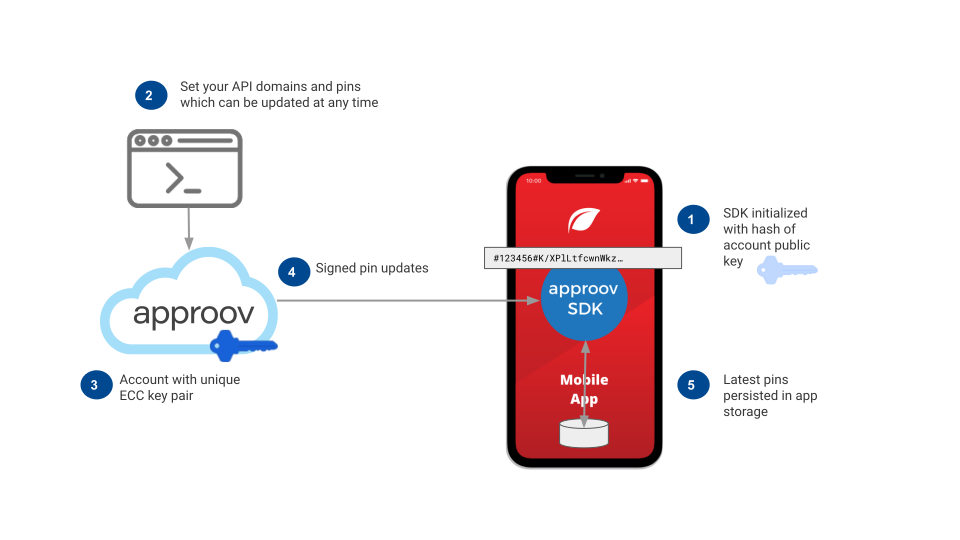
The SDK configuration is signed using Elliptic Curve Cryptography (ECC), with a hash of the public key held in the initial SDK configuration string used and the private key held securely in Approov’s servers. This allows over-the-air dynamic updates to the configuration to be sent to running apps that can be verified as being untampered and authentically issued by the Approov servers. This is guaranteed even if the update is transmitted over a channel already compromised by a MitM attack. An attacker cannot know the public/private key pair which is necessary to validly modify the update. The SDK only accepts updates consistent with the public key hash it is provided with in its startup configuration.
The pins are also held in persistent storage for the app so they are always available as soon as the app is restarted. If any change is made to the API domains and/or their pins using the approov CLI then an updated dynamic configuration will be transmitted to all apps the next time they request an attestation. This dynamic pinning is primarily designed to protect the channels over which Approov tokens or secure strings are being transmitted. However, it can also be used to protect other domains.
Approov provides two different mechanisms to ensure that the app's communication channels cannot be compromised:
| Mechanism | Description |
|---|---|
| Managed Trust Roots | Applied by default. Provides a set of trusted certificate roots issued by certificate authorities. Only connections with certificates in a chain leading to one of these trusted roots are allowed, so self-signed Man-in-the-Middle (MitM) certificates are rejected. There is no operational dependence on the specific leaf certificates used on an API endpoint, and those certificates can be rotated by the provider with no impact. |
| Explicit Pinning | Pins the connection to specific public key(s) for a certificate. This may be a leaf certificate, intermediate certificate, or root certificate. It provides even stronger protection than Managed Trust Roots, but each domain must have a notification process for upcoming public key changes; otherwise pinning can fail until updated pins are configured in Approov. |
Security Rules Updates
The Approov SDK is able to execute security analysis rules that are supplied dynamically by the Approov cloud service as illustrated below:
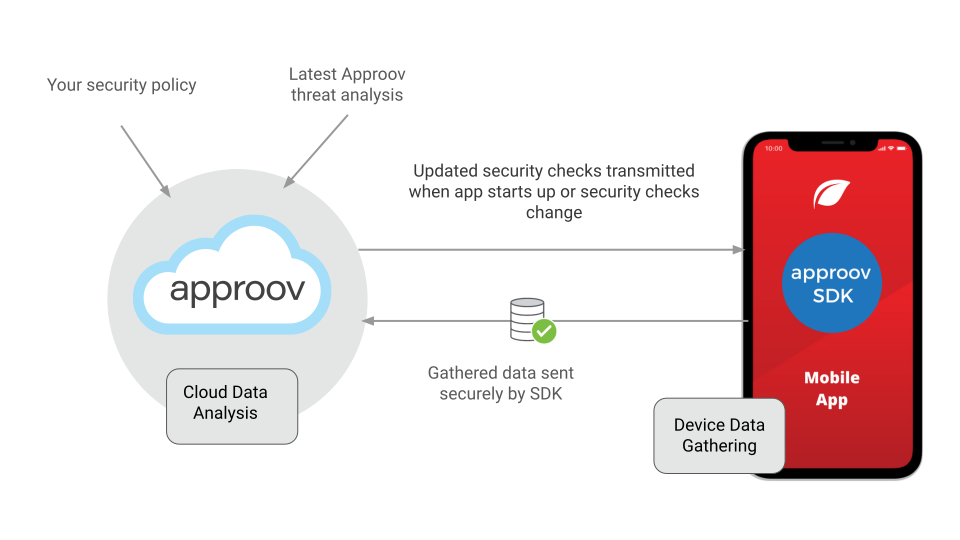
You may set your security policy and Approov researchers are continually updating the set of rules and security signatures that are being detected to indicate malicious intent inside the app's runtime environment. When the first Approov fetch is made in the app, the latest set of security rules are transmitted from the Approov cloud to the SDK. These rules specify the data to be gathered by the SDK and the checks to perform to identify particular threat signatures. The security rules are automatically updated for running apps whenever they are changed on the server.
When an attestation is performed, a predetermined subset of the gathered data and the results of signature analysis are transmitted securely to the Approov cloud. Data analysis is then performed before determining if the particular app instance should be issued with a valid or an invalid Approov token.
This mechanism is also used by Approov researchers to gather intelligence on specific devices that are associated with malicious behavior. It enables a highly reactive security stance without the requirement for SDKs within apps to be updated.
Cloud Server Redundancy
To enable a highly reliable Approov service, the backend is implemented in two different cloud service providers, as illustrated below:
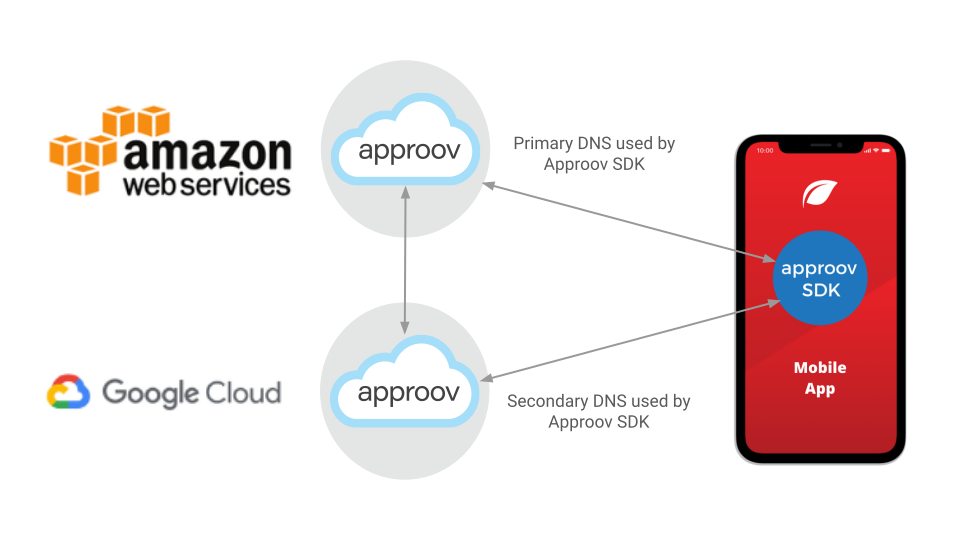
When an Approov fetch is requested, the initial transmission is sent to a primary service hosted in the AWS cloud. The primary service has multiple frontend servers deployed across the availability zones of a region and is setup to automatically scale with the service load. The particular geographic data center utilized is allocated upon sign up. Some accounts may also have support in multiple different geographic data centers to lower latencies in different parts of the world and to offer further enhanced redundancy.
If communication cannot be established with the primary service (or errors are continually returned) then the SDK attempts to make contact with the secondary (aka failover) system. This is available on a different domain name using a different TLD (Top Level Domain) to further enhance redundancy. The secondary failover system is implemented in Google Cloud to provide complete isolation from large scale failures that may occur in AWS. The failover system only provides a subset of the full analysis capability of the primary system, but it will ensure your apps should continue to receive valid Approov tokens in the event of a catastrophic primary system failure.
The failover system only provides service if it is enabled. It continually checks the primary system on a minute-by-minute basis and automatically enables itself if a primary failure is detected, with no need for any manual intervention in the switch over process.