Android SDK Integration
This section shows you how to get the Android Approov SDK and integrate it into your project in Android Studio.
Getting the Android SDK
The Android Approov SDK can be downloaded using the approov command line tool. Use the following command to download the latest SDK package:
approov sdk -getLibrary approov_sdk.aar
This writes the latest available SDK package to the approov_sdk.aar file (or any path that you specify).
You will be informed if a new SDK version is available when you register an app that contains an older version. If this happens you should consider upgrading using this command, which will always provide the latest version.
In some cases you may have been directed to use a specific version of the SDK with a particular numeric identifier. You can select it as follows, 2772 in this example:
approov sdk -getLibrary approov_sdk.aar -libraryID 2772
Importing the SDK into Android Studio
The Approov SDK minimum requirement is Android 6 (API level 23). You cannot use Approov in apps that support versions older than this.
The Approov SDK can be added to an existing app project in Android Studio using the following steps. They are based on Add your AAR or JAR as a dependency.
-
Navigate to
File > Project Structure. -
Ensure that
Dependenciesis selected in the left hand side of the dialog that pops up.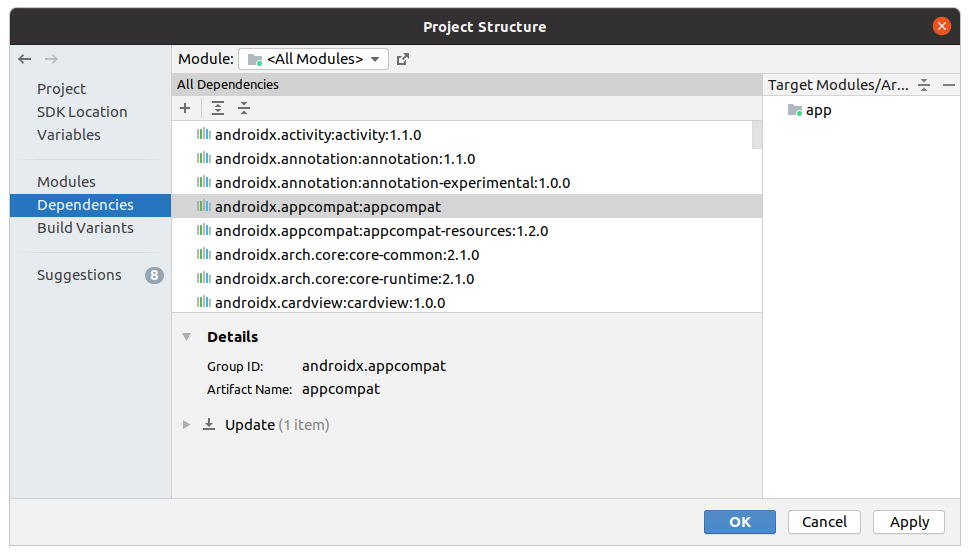
-
Click the
+and then.JAR/.AAR Dependencyin the dropdown.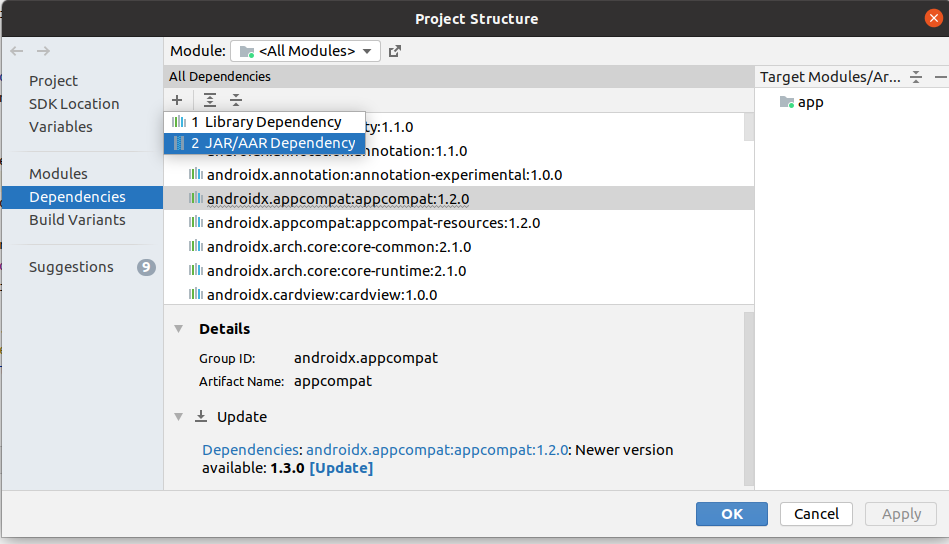
-
In the
Add Jar/Aar Dependencydialog enter the path of the.aarfile previously downloaded. Note that it is not possible to navigate to the file so you will need to copy and paste its pathname. Then clickOK.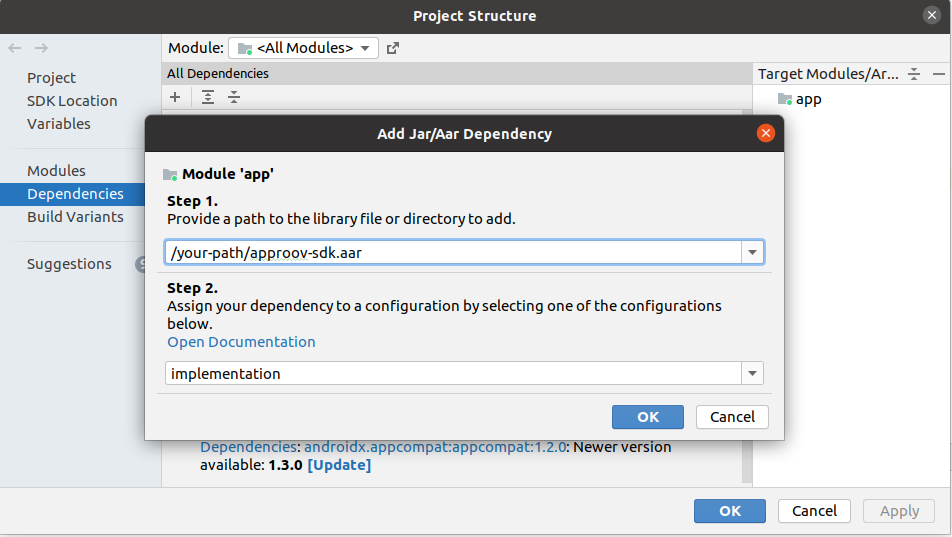
-
Click
OKin theProject Structuredialog. -
A Gradle sync will then run. If it fails check that you specified the
.aarpathname correctly.
Once you have successfully completed these steps you are ready to start making use of the Approov SDK. The SDK methods are available by importing the package:
import com.criticalblue.approovsdk.Approov;
The Approov SDK uses the OkHttp stack for making its requests, so the following dependency must be added to your Gradle file:
implementation 'com.squareup.okhttp3:okhttp:4.12.0'
Please also add the following code to your gradle file:
android {
    compileOptions {
        sourceCompatibility JavaVersion.VERSION_1_8
        targetCompatibility JavaVersion.VERSION_1_8
    }
}
The following app permissions need to be available in the manifest (AndroidManifest.xml) to use the Approov SDK, inside the top level manifest tag:
<uses-permission android:name="android.permission.ACCESS_NETWORK_STATE" />
<uses-permission android:name="android.permission.INTERNET" />
Logging output from the Approov SDK can be seen under the Approov tag in logcat. Normally the SDK is silent except during initialization or if there is a problem with connectivity. Approov support may require this logging to answer any issue you may raise.
The initial logging on startup will be similar to the following:
2019-05-29 11:53:06.637 4997-4997/? I/Approov: test-account, com.criticalblue.demo, 2.5.0(2974), h4gubfCFzJu81j/U2BJsdg==
It provides information about the account, app, SDK and the device ID.