Offline Security Mode
This section discusses the Approov feature that allows the SDK to prove to a remote hardware device, not directly connected to the Internet, that it is a genuine instance of a particular app. The methods used here are not supported in our frontend integration quickstarts so if you wish to use these features then you must call the SDK directly.
Use Case
This feature is useful for specific use cases where the mobile device and/or some other remote hardware being commanded by an app may not have a continuous Internet connection. Approov attests itself in the normal way and accesses an API, but additional step for this flow causes a measurement of the app integrity to be taken. This is included in some communication from the backend API to the remote hardware. This will include an encrypted form of the measurement that only the remote hardware is able to decrypt. The remote hardware is then able to know the value of the prior measurement made on the app. An offline attestation process between the app and the remote hardware then proves that the app is able to reproduce the measurement without actually transmitting it. This assures the remote hardware that it is being commanded by the same app that was earlier measured. This prevents an attacker from commanding the remote hardware using any other client software.
Note that this feature must be enabled in the Approov cloud service before it can be used from an app. Contact Approov support if you are not sure of the status or wish to perform a trial of the feature. It is not provided in our standard Approov commercial package.
Operational Flow
The following provides an overview of the steps required to obtain and use a measurement proof using the offline security feature. The first stage is the app obtaining a measurement:
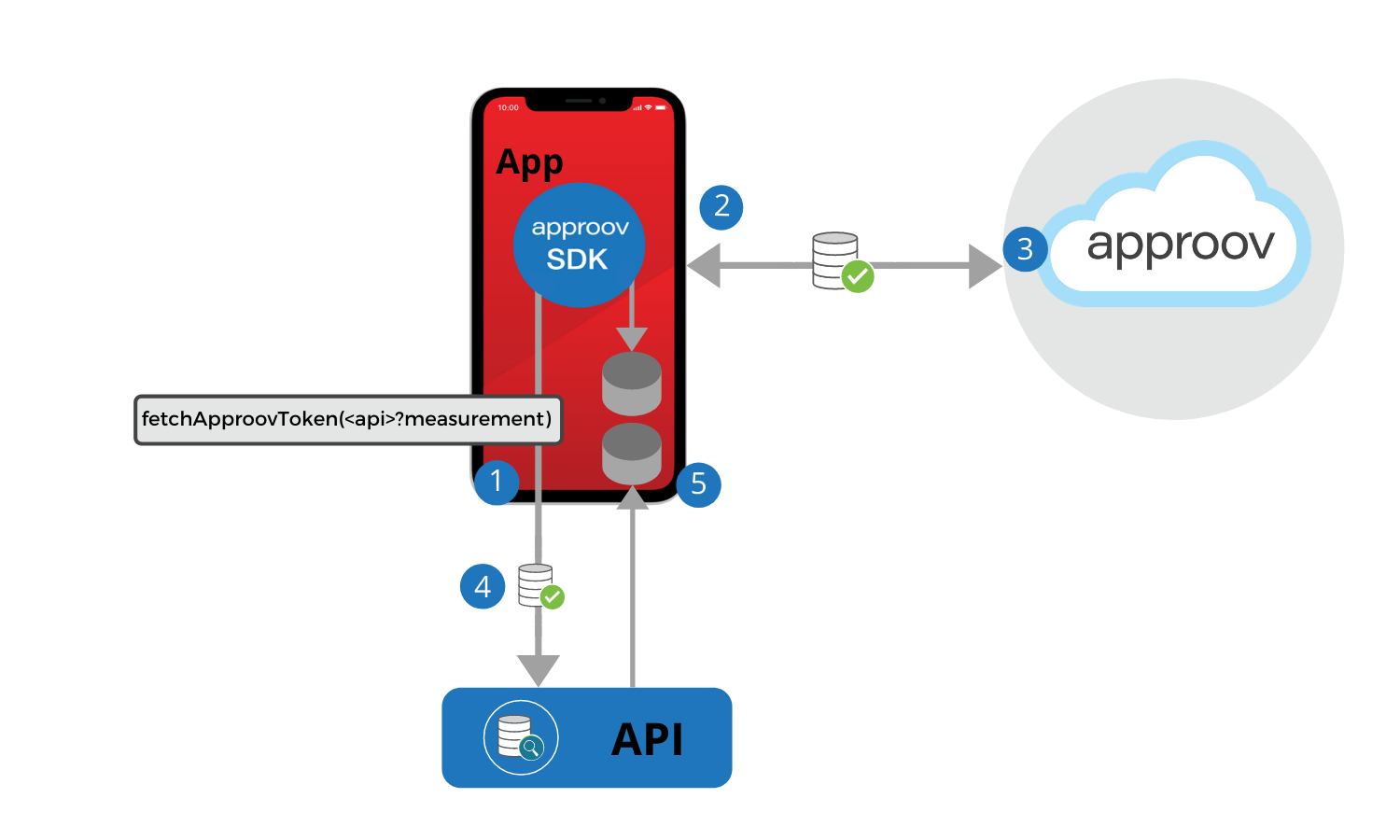
- A special Approov token fetch must be performed that also performs a measurement. This takes the API domain to which the measurement is to be sent with the suffix
?measurement. The fetched Approov token will contain additional information for the collected measurements. The domain must have encrypted JWE tokens enabled, so that the measurements cannot be read by any 3rd party if they are somehow able to intercept the request. - During the Approov token fetch, a full app Integrity Measurement (IM) and a Device Measurement (DM) are made by the SDK. These are both derived from very similar analysis and data as the main measurements required to obtain a token. The IM is a 256-bit HMAC result that encompasses all aspects of the app and mobile device, but is designed to always produce a stable result from the same app on the same mobile device, even if the app or the whole mobile device is rebooted. The DM is also a 256-bit result but is specifically designed to only include data sources that are device specific, or specific to data stored by the app in internal storage. This means that this hash should be stable even if the app is updated (including an update to the version of the Approov SDK that is embedded within it). A property of both the IM and DM is that they are salted by a nonce value. This means that the actual hash values are different for each Approov attestation, even if the app and its environment have not changed.
- The Approov cloud evaluates the attestation request as normal. The only difference is that the generated Approov token will have an additional claim providing encrypted forms of the IM, DM and also the Measurement Proof Key (MPK). The MPK is a 128-bit key that is dissolved into the code of a particular version of the SDK and is also known by the Approov backend.
- The app will pass the Approov token containing the measurements to the backend API. The backend evaluates the request, checking the validity of the Approov token. If the verification checks are passed, then some form of measurement token is created to pass to the remote hardware, containing the measurements from the Approov token. This will be encrypted by a public key known to the backend, with the decrypting private key held securely in the remote hardware. This means that only the remote hardware is able to know the contents.
- As an additional result of performing a measurement during an Approov token fetch, a Measurement Configuration (MC) is also provided as part of the result. This is a binary data blob that must be held in local storage. It contains the configuration information that will be used by the app to reproduce integrity and device measurements in the future. The contents of this data are signed (in the sense that any modification will impact the measurement results) so an attacker cannot tamper with it. This is saved into persistent storage of the app. Furthermore, the encrypted measurement token provided by the API is also persisted in the local storage of the app.
The next step (which may be repeated an arbitrary number of times) is to perform a measurement proof between the app and a remote hardware device:
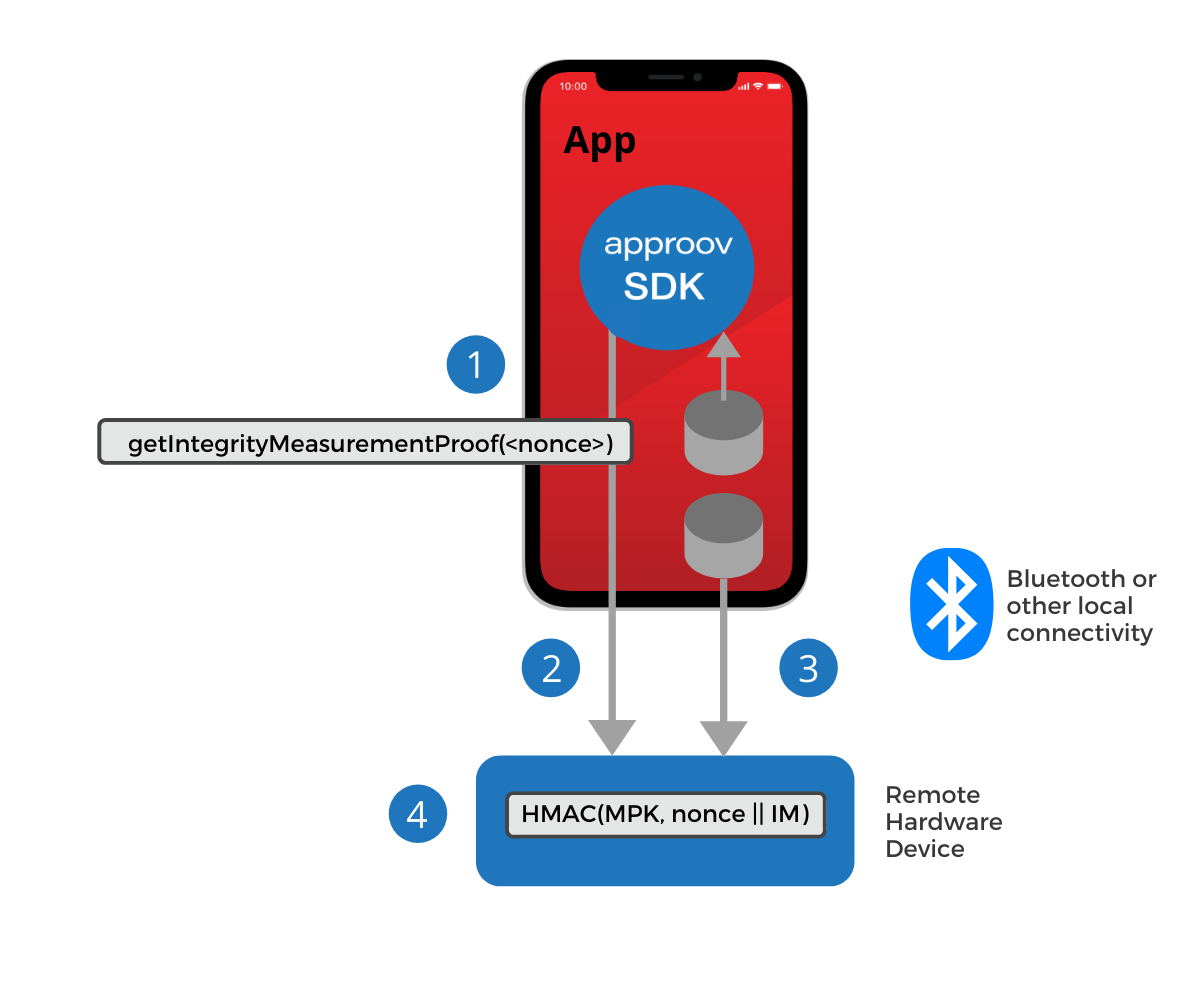
- Methods (
getIntegrityMeasurementProofandgetDeviceMeasurementProof) are provided in the Approov SDK to allow a measurement proof to be made, salted by a nonce value provided by the app. This should be different each time, to prevent replay attacks. The measurement proof methods require the MC file that was saved earlier. Since this is held in persistent local storage the app can be closed, and indeed the mobile device rebooted, between measurements and the same result will be obtained if no tampering of the app has occurred. Crucially, this entire measurement proof process does not require any Internet access. - The measurement proof result is transmitted to the remote hardware device over some local communication link, such as Bluetooth.
- The measurement token, that was stored earlier, and contains the encrypted measurement is also communicated to the remote hardware device over the local communication link.
- The remote hardware is able to check any measurement proofs since it has access to the known good measurement values decrypted from the measurement token. Thus it can determine if the same app instance is making the request as was originally validated by the API backend. Only the remote device is able to decrypt the measurement token since only it is in possession of the required private key.
Backend Integration
In order to support offline mode there are some requirements on the backend integration for the API domain that is responsible for issuing measurement tokens to the remote hardware. A key requirement is that some Public Key Infrastructure (PKI) needs to be in place with the remote hardware. This means that the backend API can encrypt the measurement token and only the specific remote hardware (or class of remote hardware) should be able to decrypt the contents. Of course this depends on keeping the private key in the remote hardware secure, but this is beyond the scope of Approov.
The backend API must check the Approov token in the normal way, but then extract the imh (Integrity Measurement Hash), dmh (Device Measurement Hash) and mpk (Measurement Proof Key) out of the Approov token and put the values into the measurement token.
Encrypted JWEs must be used on endpoints to which measurements are transmitted for additional security.
Remote Hardware Integration
It is envisaged that the app will communicate with a remote hardware in order to command it in some manner. This will require a combination of a valid measurement proof and likely other user credentials to be accepted by the remote hardware. In other words, it is checking that it is being commanded by the right software and by the right user. The exact channel of communication is independent of the Approov feature, but a typical choice is Bluetooth.
A valid measurement proof indicates that the Approov SDK is able to reproduce the integrity measurement value that was calculated earlier when the measurement was first obtained. Each measurement is salted with a 128-bit nonce value to prevent replays of prior results. A measurement is actually an HMAC of the measurement salted by the nonce. The method of choosing this nonce is not defined by Approov.
The remote hardware implementation must do the following:
- Decoding Measurement: The measurement token transmitted to the remote hardware should be decrypted by the hardware using its private key. This gives it access to the Integrity Measurement (IM) and potentially also the Device Measurement (DM). The Measurement Proof Key (MPK) also needs to be decrypted as it is used in the measurement proofs.
- Checking Measurement Proofs: The Approov SDK calculates the integrity measurement proof HMAC result. It does not need Internet access to be able to do this and the overall calculation should not take more than approximately 100ms. The integrity measurement is recalculated on the fly during this call and used to calculate the result of
HMAC(MPK, nonce || IM). The Measurement Proof Key (MPK) is dissolved in the obfuscated code of Approov and provides a further layer of security. The result is a 256-bit value called the Integrity Measurement Proof (IMP). This IMP value is transmitted to the remote hardware and it must perform exactly the same HMAC calculation. Note that a Device Measurement Proof (DMP) can be calculated in exactly the same manner. - Restricting Access: Once the IMP (and/or DMP) have been calculated they can be compared with that provided by the SDK. If they do not match then some aspect of the app or its runtime environment has changed since the original measurement. This would normally result in an access denial. Some useful error state should be returned to the app, so that it can suggest to the user that they will need to redo the original measurement process and verification by the API backend.
Requesting a Baseline Measurement
As discussed previously, the first stage in making an Approov measurement is to request a token in measurement mode. Example code to do this is as follows:
- Java
- Swift
Approov.TokenFetchResult approovResult = Approov.fetchApproovTokenAndWait("https://api.myservice.io/endpoint?measurement");
let approovResult = Approov.fetchTokenAndWait("https://api.myservice.io/endpoint?measurement");
This is a standard token fetch call, except for the ?measurement suffix of the provided domain. This forces a measurement to occur, even if there is a previously cached and valid Approov token. The expectation is the special measurement token will be sent to the endpoint api.myservice.io/endpoint.
Persisting the Measurement Configuration
Next, the measurement configuration obtained from this measurement must be saved to local app storage. This code provides an example approach:
- Java
- Swift
if (approovResults.getStatus() == Approov.TokenFetchStatus.SUCCESS)
    // check that we obtained a configuration measurement (this should always be the case
    // but we check in case there has been an error)
    byte[] measurementConfig = approovResults.getMeasurementConfig();
    if (measurementConfig == null) {
       // error handling
    }

    // save the measurement configuration to local storage
    try {
        FileOutputStream outputStream = getApplicationContext().openFileOutput("measurement_config.bin", Context.MODE_PRIVATE);
        outputStream.write(measurementConfig);
        outputStream.close();
    } catch (IOException e) {
        // error handling
    }
}
if approovResult.status == ApproovTokenFetchStatus.success {
    // check that we obtained a configuration measurement (this should always be the case
    // but we check in case there has been an error)
    if approovResult.measurementConfig == nil {
        // error handling
    }

    // save the measurement configuration to local storage
    let URLs = FileManager.default.urls(for: .documentDirectory, in: .userDomainMask)
    let measurementConfigURL = URLs[0].appendingPathComponent("measurement_config.bin")
    do {
        try approovResult.measurementConfig!.write(to: measurementConfigURL)
    } catch {
        // error handling
    }
}
This saves the configuration to the local file measurement_config.bin. A saved measurement configuration is required in order to perform subsequent proofs that the integrity measurement has not changed. By saving the measurement configuration the app is able to perform such checks even if the app is restarted.
Getting a Measurement Proof
At some point later, a measurement proof may be required to communicate the app’s authenticity to a remote hardware. First, the measurement configuration must be loaded from local app storage again. Example code is as follows:
- Java
- Swift
byte[] measurementConfig = null;
try {
    InputStream stream = getApplicationContext().openFileInput("measurement_config.bin");
    DataInputStream reader = new DataInputStream(stream);
    measurementConfig = new byte[stream.available()];
    reader.readFully(measurementConfig);
    reader.close();
} catch (IOException e) {
    // error handling
}
let URLs = FileManager.default.urls(for: .documentDirectory, in: .userDomainMask)
let measurementConfigURL = URLs[0].appendingPathComponent("measurement_config.bin")
var measurementConfig : Data? = nil;
do {
    measurementConfig = try Data.init(contentsOf: measurementConfigURL)
} catch {
    // error handling
}
Once the measurement configuration is available, a measurement proof calculation can be performed as follows:
- Java
- Swift
byte[] integrityProof = Approov.getIntegrityMeasurementProof(proofNonce, measurementConfig);
if (integrityProof == null) {
    // error handling
}
let integrityProof = Approov.getIntegrityMeasurementProof(proofNonce, measurementConfig!)
if integrityProof == nil {
    // error handling
}
This generates a 32 byte result in the integrityProof variable. The result of this is a combination of the measurement taken earlier when the Approov token was fetched, and a 16-byte proofNonce value provided by the application. The choice of the nonce is beyond the scope of this document, but it should be varied on each measurement proof.
The measurement proof value can then be transmitted to the remote hardware, along with any other relevant credentials as part of any command from the app to the remote hardware The hardware is able to evaluate this to determine if the app has calculated the same integrity measurement value as previously. Since a non-replayable HMAC proof value is being transmitted, any attacker able to steal data from the channel will not be able to infer the actual integrity measurement value or replay the data later.
If any of the characteristics of the app’s integrity changes, then the computed value will differ and access will be denied. This occurs if there is any change to the app itself, or if the runtime environment has changed. For instance if the app is now under debug, or subject to analysis by a framework, then the measurement will be altered. The measurement may also change if the operating system version of the device on which the app is installed is upgraded.
Note that the Approov SDK also includes a getDeviceMeasurementProof method. This is used in exactly the same way, but only measures attributes of the mobile device on which the app is running. Thus this calculation will not be impacted by any update to the app (or device's OS) that is being attested.
We recommend you include a mechanism to report unexpected changes in measurements to Approov, where these can be investigated and the exact cause of the difference determined. To do this we suggest your app remembers the measurement for a given proof nonce at the time of the initial measurement. If this changes unexpectedly then call the SDK method setUserProperty with the string parameter $error. Then perform an additional (non-measurement) Approov token fetch. This will require Internet access. This combination will cause additional logging to be collected by Approov's server side to aid investigation.